
Last updated on
Nov 6, 2026

CA SB-13100 2014-2026 free printable template
pdfFiller is not affiliated with any government organization

Fill out
Complete the form online in a simple drag-and-drop editor.

eSign
Add your legally binding signature or send the form for signing.

Share
Share the form via a link, letting anyone fill it out from any device.

Export
Download, print, email, or move the form to your cloud storage.
Why pdfFiller is the best tool for your documents and forms


End-to-end document management
From editing and signing to collaboration and tracking, pdfFiller has everything you need to get your documents done quickly and efficiently.
Accessible from anywhere
pdfFiller is fully cloud-based. This means you can edit, sign, and share documents from anywhere using your computer, smartphone, or tablet.
Secure and compliant
pdfFiller lets you securely manage documents following global laws like ESIGN, CCPA, and GDPR. It's also HIPAA and SOC 2 compliant.
What is CA SB-13100
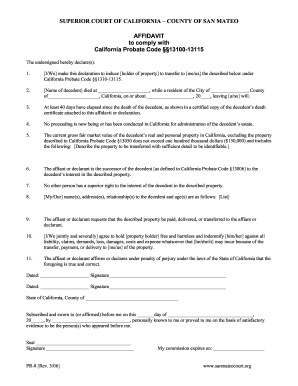
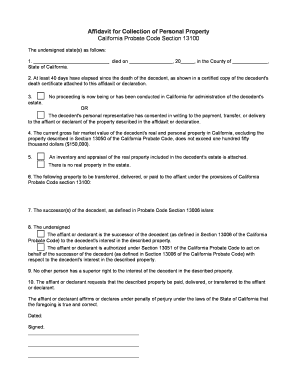
The California Affidavit for Property Transfer is a legal document used by individuals to transfer property in California under Probate Code §§13100-13115.
pdfFiller scores top ratings on review platforms




SO far excellent. Well thought out software design.
works great
works great, super easy to use
Great Functionality, Amazing Customer Support, Great Experience Overall
This is a great platform, very seamless and user friendly. It does cost a bit so it would make sense if you use it quite often. More importantly, amazing support - the online chat response was quick (!!!), customer support staff was so friendly and understanding. Overall, such an amazing experience using this platform. Highly recommend you give it a go!
PDFfiller has lots of useful functions to edit PDF files and very easy to use.
My experience was good it's a great product.
awesome program easy to use
Who needs CA SB-13100?
Explore how professionals across industries use pdfFiller.

CA SB-13100 is needed by:
-
Beneficiaries of a decedent's estate
-
Individuals handling small estate distributions
-
Affiants or declarants involved in property transfers
-
Notary Publics assisting with document validation
-
Estate administrators managing court documents
-
Legal professionals involved in probate matters
Comprehensive Guide to CA SB-13100
What is the California Affidavit for Property Transfer?
The California Affidavit for Property Transfer is a legal document that facilitates the transfer of property ownership without the necessity of probate hearings. This process is outlined in the California Probate Code, specifically sections 135. This affidavit is often required in situations where an estate's value is under $150,000, allowing heirs or beneficiaries to claim their inheritance efficiently.
Purpose and Benefits of the California Affidavit for Property Transfer
The primary purpose of the California Affidavit for Property Transfer is to simplify the process of transferring property, particularly for small estates. The benefits include:
-
Enables property transfer without the need for lengthy probate hearings.
-
Offers a cost-effective alternative to more complex legal processes.
-
Allows for the expedited settlement of estates valued under $150,000.
Who Needs the California Affidavit for Property Transfer?
Beneficiaries or heirs may need the California Affidavit for Property Transfer in specific situations regarding property inheritance. Eligible individuals typically include those named in small estates, making it essential for family members managing estate affairs to understand when this document is relevant.
Eligibility Criteria for the California Affidavit for Property Transfer
To successfully file the California Affidavit for Property Transfer, certain eligibility criteria must be met:
-
The estate must be valued at $150,000 or less.
-
Documentation regarding the decedent's estate is required.
-
There must be no ongoing probate proceedings.
How to Fill Out the California Affidavit for Property Transfer Online (Step-by-Step)
Filling out the California Affidavit for Property Transfer can be accomplished online through platforms like pdfFiller. Follow these steps:
-
Access the affidavit template on pdfFiller.
-
Enter the name of the decedent and property details accurately.
-
Complete all required fields, ensuring accurate affiant information.
-
Review the entered information for errors to minimize common mistakes.
-
Save and export the completed affidavit for notarization.
Review and Validation Checklist for Your Affidavit
Before submitting your California Affidavit for Property Transfer, ensure you review the following checklist:
-
Verify completeness of all fields and affiant information.
-
Ensure all required signatures are included.
-
Check the notarization requirements have been followed.
How to Sign or Notarize the California Affidavit for Property Transfer
The signing and notarization process for the California Affidavit for Property Transfer can vary. Key aspects include:
-
Options for digital signatures or traditional wet signatures.
-
Specific notarization requirements under California law.
-
Best practices to ensure the affidavit's validity during signing.
Submission Methods and Delivery of the California Affidavit for Property Transfer
Submitting the completed California Affidavit for Property Transfer can be done in several ways:
-
In-person submission at the relevant county office.
-
Mailing the affidavit to the appropriate local authority.
-
Utilizing online submission options when available.
Be aware of deadlines and any potential penalties for late submissions to avoid complications.
Managing Your California Affidavit Submission: After You File
After filing your California Affidavit for Property Transfer, several steps can help you manage your submission effectively:
-
Check your application status periodically for updates.
-
Be prepared to correct or amend the affidavit if necessary.
-
Understand common reasons for rejection to address them directly.
Why Choose pdfFiller for Your California Affidavit for Property Transfer
Using pdfFiller to handle your California Affidavit for Property Transfer offers numerous advantages:
-
Cloud-based convenience that allows for editing, filling, and signing from any browser.
-
Enhanced security features ensuring the protection of personal and sensitive data.
-
A user-friendly interface designed for effortless document management.
How to fill out the CA SB-13100
-
1.Access the California Affidavit for Property Transfer on pdfFiller by searching for the form in the platform's search bar or browsing the legal forms category.
-
2.Open the form and start by reading the instructions provided at the top, familiarizing yourself with the document's requirements.
-
3.Gather the necessary information before filling out the form, ensuring you have details about the decedent, property, and affiant.
-
4.Using pdfFiller's interface, begin to enter details in the required fields. Click on the blank spaces to type directly or use the toolbar for additional tools.
-
5.Ensure accurate entries in each field, especially the decedent's name, property description, and your signature lines as the affiant.
-
6.If applicable, tick the boxes for any checkbox options and ensure all required information is provided.
-
7.Conduct a thorough review of the entire filled form before finalizing; check for any typographical errors or omissions.
-
8.Once reviewed, you can finalize the document by signing where indicated. If you require notarization, schedule it accordingly.
-
9.Save your completed affidavit by using the 'Save' option, which allows you to store it on your pdfFiller account or download it to your device.
-
10.Consider options for submitting the form; depending on your needs, print it to mail or submit electronically as allowed.

Who can use the California Affidavit for Property Transfer?
The California Affidavit for Property Transfer is primarily used by beneficiaries of estates valued under $150,000 without ongoing probate proceedings, allowing them to transfer property without extensive legal processes.
What are the eligibility requirements for using this affidavit?
To use the California Affidavit for Property Transfer, you must be either the affiant or declarant and provide valid identification. The affidavit is applicable for estates under $150,000, making it ideal for small estate transfers.
Is notarization required for this form?
Yes, the California Affidavit for Property Transfer must be notarized to be valid. Both the affiant or declarant and the notary public need to sign the document before it can be submitted.
What types of property can be transferred using this affidavit?
This affidavit can be used to transfer various types of property, including real estate and personal items, as long as the total value does not exceed $150,000 and there are no open probate proceedings.
How do you avoid common mistakes while filling out the form?
To avoid mistakes, carefully review each field before submitting the form. Double-check the names, signatures, and ensure that all required fields are filled out accurately according to the instructions provided.
What should I do if I need additional documents?
If additional supporting documents are needed, like proof of death or identification, gather these documents before completing the affidavit. Ensure all necessary attachments accompany the submission when required.
What is the processing time for the affidavit after submission?
Processing time for the California Affidavit for Property Transfer depends on the local court's procedures, but it typically doesn't involve prolonged wait times as it is an easier process compared to full probate.
Related Content
Related Forms


Related Catalogs
Get the latest insights from our blog


If you believe that this page should be taken down, please follow our DMCA take down process
here
.
This form may include fields for payment information. Data entered in these fields is not covered by PCI DSS compliance.